Home/SVG tools and import help/SVG cut file checker: local preview and named checks

SVG cut file checker

See an SVG’s size, layers and anything that may not cut, before you upload it. Your file stays on your device.

Free · No sign-up · Your file is never uploaded

Lire cette page en français

Up to 500 KB.

Flags small round and rectangular pieces, and thin lines, below this size. It doesn’t measure every gap or bridge. Leave blank to skip.

Files with scripts, links to outside files or embedded pictures are turned away. Only files that pass these safety checks get a preview.

What the file contains

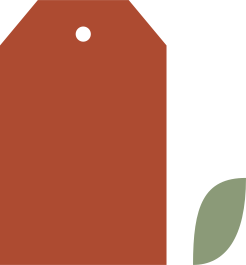
Example: our classic gift tag, checked here. Drop your SVG to check it instead.

Checked

No problems found

Some things can’t be told from the file

10 of 13 checks passed; the rest can’t be told from the file alone.

Nothing in the file needs changing before you import it. The checker reads the file only; it can’t tell how it will cut on your machine or material.

0 to check · 3 can’t tell from the file · 10 passed

Preview of your SVG

Can’t tell from the file

Shapes stacked twice
0 exact copies sitting on top of each other (they would cut twice). Moved or differently written copies aren’t checked.
Small pieces
Not checked. Enter the smallest piece your machine cuts cleanly, and use a file that states its size in mm, cm or inches.
Thin lines
Not checked. A line’s width on screen isn’t the width of material left after cutting.

Passed checks

Scripts and outside links
No scripts, links to outside files or embedded pictures.
Elements
6 parts in the file, 2 of them paths. Files with more than 5,000 parts are flagged.
Text
No live text.
Embedded pictures
No embedded pictures.
Gradients
Gradients only change how it looks; they don’t become separate cut layers.
Open paths
0 open paths (lines whose ends don’t meet). They may be fold lines on purpose.
Opacity
See-through or hidden shapes may still come in as cut lines. Check them before you set Cut or Score.
Filters
Filter effects such as shadows and blurs don’t become cut lines.
Clipping and masks
Clipping can hide parts of a shape on screen that your cutting software may still cut.
Dimensions
The file should state its width and height and have a viewBox, so it imports at the right size.

File size: 465 bytes. 6 elements; 2 paths.

Colors: #ad4b31, #8b9a78

  • #ad4b31: 1 shape
  • #8b9a78: 1 shape
Resize the SVG →
Width set in the file
65 mm
Height set in the file
70 mm
viewBox
0 0 65 70
Aspect ratio
0.93
Shapes
2 path, 0 rect, 0 circle, 0 ellipse, 0 line, 0 polyline, 0 polygon
Groups
tag-outlines-1, optional-accents-2
Flat colors
#ad4b31, #8b9a78
Text / stroked shapes / open paths
0 / 0 / 0
Gradients / patterns / filters
0 / 0 / 0
Masks / clipping
0 / 0
Raster images / external references
0 / 0
Outside the drawing area (viewBox)
Couldn’t measure every shape
Shapes we couldn’t measure
2
Elements
6
Shapes stacked twice (they would cut twice)
0 (moved or rotated shapes weren’t compared). Only exact copies count.
Drawing edges
Couldn’t measure for this drawing
Finished size
Can’t tell from the file: it doesn’t say how the pieces go together.

For text, fills and clipping, see the guide to SVG items your software may not import

Your file stays on your device; nothing is uploaded.

What the checker tells you

The width and height set how big the file opens; the viewBox is the drawing’s own grid. Counting shapes and layers helps you understand a file, but can’t tell you for sure how it will import or cut. When an outline is too complex to measure safely, the checker leaves its size blank instead of guessing.