Home/SVG design library/Pantry labels SVG and storage label shapes/Fold-over basket rim label SVG: free cut file

Fold-over basket rim label SVG

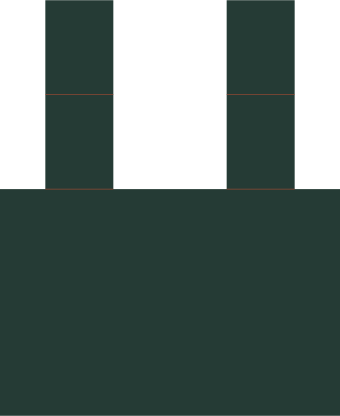
Fold-over basket rim label SVG pieces
Size with margin: 90 × 110 mm (3½ × 4⅜ in)

Free SVG · No account needed

Finished size 90 × 60 mm (3½ × 2⅜ in)

Download Fold-over basket rim label SVG ↓

The other formats are made in your browser, at the same size; nothing is uploaded. The DXF puts the fold lines on a layer of their own; the PDF prints them black, like the cut lines. Either way, set them to Score before you cut.

Yes, you can sell what you make →

A writing face with two fold-back tabs for a basket rim. The tabs fold around the rim and fasten to the back; they don’t grip on their own. The tabs fit a rim up to 25 mm thick (the distance between the two scores).

Cut size
90 × 110 mm (3½ × 4⅜ in)
Size with margin
90 × 110 mm (3½ × 4⅜ in)
Shapes
1
Layers
2

What you need

  • Cardstock: see paper and card weights for what holds a fold
  • A scoring stylus or scoring wheel for the fold lines
  • Glue or double-sided tape for any joins
Fit it to your blank →

What is in the SVG

cut outlines; score guides. The preview shows the shapes in the file. It is not a photo of a finished project.

Resize matching pieces together so they still fit. Material, machine settings and any wording are yours to choose.

  1. Cut the outline and score the red guides.
  2. Fold the tabs back around the rim. Adjust their folds to its measured depth.
  3. Fasten the tab ends behind the face without closing over the basket weave.

Need another size? Resize the SVG, or check it in the SVG checker. Then set the thin rust fold lines to Score in your software.

Download the full label SVG shapes for jars and shelves when you need the matching designs.

Related designs

Want another format? Convert the SVG to DXF or make a PNG preview. It happens in your browser; nothing is uploaded.